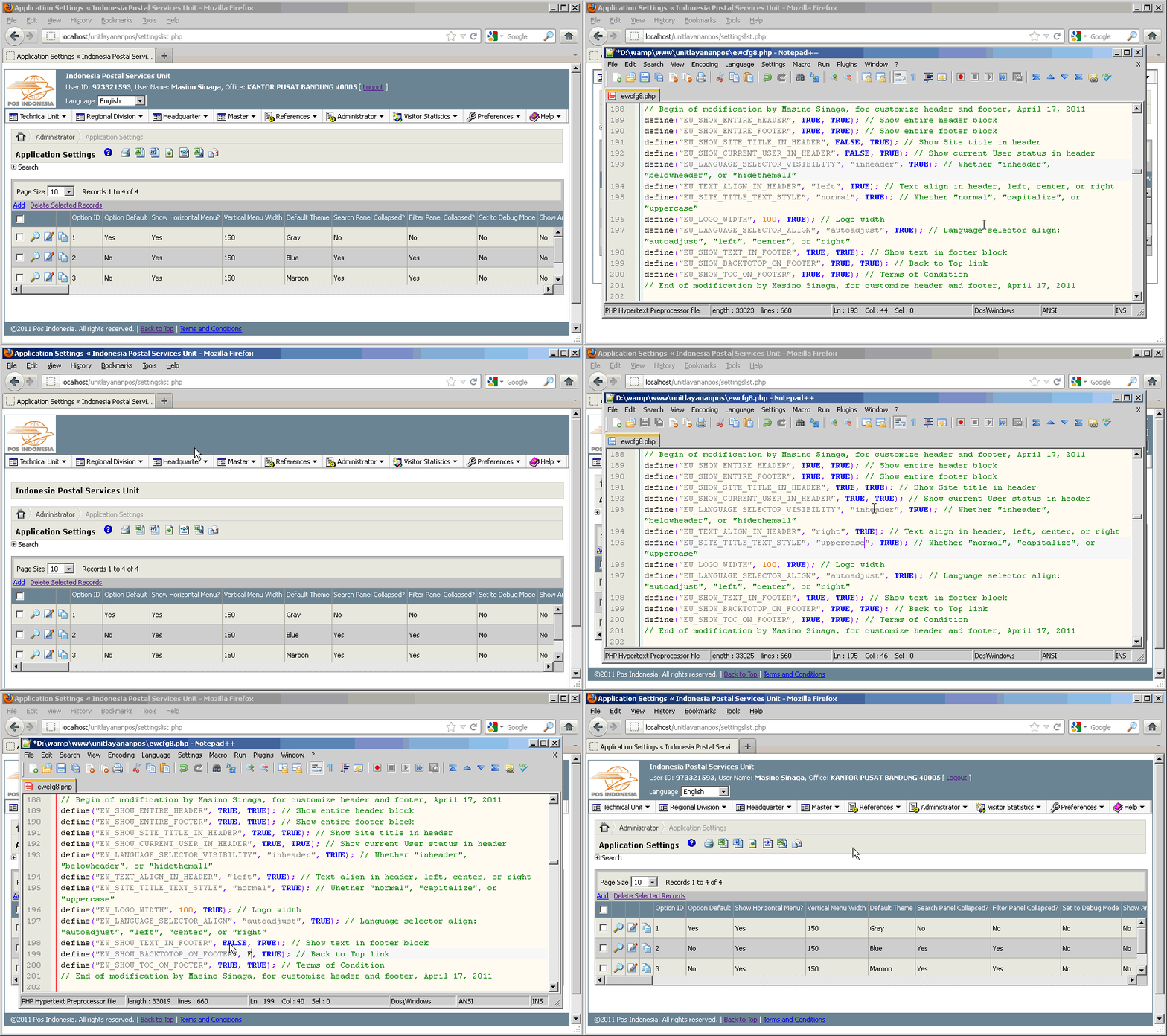
This time we will customize the look of the header and footer of your web application that created with PHPMaker version 8.0.1. There are some constants that were added into the configuration file that aims to support the change of your header and footer view. Mosf of information that we will add to the header and footer is the common functional that usually exists in a website application, and they are controlled by the usage of the related constants.
Some of these constants are for:
- Display or hide the entire header,
- Display or hide the entire footer,
- Display or hide site title in header,
- Display or hide current Username in header,
- Display or hide the Languages Selector (whether "in the header", "below the header", or "hide them all"),
- Text-alignment for Site Title, current Username, and Languages Selector.
- Display the style of Site Title (whether "normal", "capitalize", or "uppercase"),
- Logo width setting (this will adjust the space between logo image and Site Title, current Username, and Languages Selector),
- The Language Selector alignment (whether "autoadjust", "left", "center", or "right"),
- Display or hide the copyright text on footer,
- Display or hide the "Back to Top" link on footer,
- Display or hide the "Terms and Conditions" link on footer,
After implementing this modifications, now you can customize your header and footer and the related items by simply changing the value of the related constants.
Updated: This modification has been tested and works fine also for the latest version, PHPMaker 8.0.3 on August 27, 2011.
All we have to do is customizing PHPMaker template files. In other words, we will not modify the generated script files.
Please click on the following image to watch the demo:
[hidepost]
-
Open your C:\Program Files\PHPMaker 8\languages\english.xml file, and find this code:
</global>
before that line, insert this following code:
    <phrase id="Welcome" value="Welcome"/>
    <phrase id="AskToLogout" value="Are you sure you want to logout now?"/>
    <phrase id="BackToTop" value="Back to Top"/>
Do the same way to your another .xml language file, for example, I am using Indonesian language too, so I add this following code into my indonesian.xml file:
<phrase id="Welcome" value="Selamat Datang"/> <phrase id="AskToLogout" value="Anda yakin ingin logout sekarang?"/> <phrase id="BackToTop" value="Kembali ke Atas"/> -
Next step, we will add our new style to the .css file that will be generated by PHPMaker. This will overide the height of html and body section in your generated pages. From your PHPMaker application, go to HTML tab, then click on Styles sub-tab, and then click on Edit Styles button. You will see a CSS Editor window afterwards. Scroll down to the bottom of that textbox, and find this code:
/*END_USER_STYLES*/
before that line, insert this following code:
html, body {
    height: auto;
}
That modification will make your page height to automatically adjust to the maximum height of the current content page. This will overide the old “100%” value of the html and body section of your page, since the old value will break your layout if using this current modification.
-
Open your \Script\ewcfg.php file, and find this code:
define("EW_DEBUG_ENABLED", <!--##=ew_Val(PROJ.GetV("Debug"))##-->, TRUE); // TRUE to debugafter that line, insert this following code:
// Begin of modification by Masino Sinaga, for customize header and footer, April 17, 2011 define("EW_LANGUAGE_SELECTOR_VISIBILITY", "inheader", TRUE); // Whether "inheader", "belowheader", or "hidethemall" define("EW_LANGUAGE_SELECTOR_ALIGN", "autoadjust", TRUE); // Language selector align: "autoadjust", "left", "center", or "right" define("EW_SHOW_SITE_TITLE_IN_HEADER", TRUE, TRUE); // Show Site title in header define("EW_SHOW_CURRENT_USER_IN_HEADER", TRUE, TRUE); // Show current User status in header define("EW_SHOW_ENTIRE_HEADER", TRUE, TRUE); // Show entire header block define("EW_SHOW_ENTIRE_FOOTER", TRUE, TRUE); // Show entire footer block define("EW_SHOW_TEXT_IN_FOOTER", TRUE, TRUE); // Show text in footer block define("EW_TEXT_ALIGN_IN_HEADER", "left", TRUE); // Text align in header, left, center, or right define("EW_SITE_TITLE_TEXT_STYLE", "normal", TRUE); // Whether "normal", "capitalize", or "uppercase" define("EW_LOGO_WIDTH", 170, TRUE); // Logo width define("EW_SHOW_BACKTOTOP_ON_FOOTER", TRUE, TRUE); // Back to Top link define("EW_SHOW_TOC_ON_FOOTER", TRUE, TRUE); // Terms of Condition // End of modification by Masino Sinaga, for customize header and footer, April 17, 2011 -
Open your control.xml file, and find this code:
	<control id="ew.js" type="other" ofolderid="_js" ifiles="ewp.js" ofile="ewp8" oext="js">
		<session type="key" value="jscommon" />
	</control>
after the last line of that code, insert this following code:
<control id="scroll.js" type="copy" remark="Copy scroll.js" ofolderid="_js" ifiles="scroll.js" />
-
Open your \Script\template.php file, and replace entire code inside that file with this following code (It is Strongly Recommended to backup your template.php file before doing this step!):
<!--##session common_config##--> <!--## ' Export sProjName = PROJ.ProjName sProjVar = PROJ.ProjVar If SYSTEMFUNCTIONS.IsExport Then sTmplExpStart = "<?php if (@$gsExport == """") { ?>" sTmplExpEnd = "<?php } ?>" sTmplPrintExpStart = "<?php if (@$gsExport == """" || @$gsExport == ""print"") { ?>" Else sTmplExpStart = "" sTmplExpEnd = "" sTmplPrintExpStart = "" End If ' Config YUI options bUseYuiAddOpt = UseYuiAddOpt() bUseYuiAutoSuggest = UseYuiAutoSuggest() bUseYuiAutoFill = UseYuiAutoFill() bUseEmailExport = UseEmailExport() ' Export to Email bUseTooltip = UseTooltip() ' Use Tooltip bUseYuiTab = UseYuiTab() ' Use Yui Tab bUseYuiContainer = (bUseYuiAddOpt Or bUseEmailExport Or bUseTooltip) ' Use Yui Container bUseYuiButton = (bUseYuiAddOpt Or bUseEmailExport) ' Use Yui Button bUseYuiDataSource = (bUseYuiAutoSuggest Or bUseYuiAutoFill) ' Use Yui Data Source bUseYuiAutoComplete = (bUseYuiAutoSuggest Or bUseYuiAutoFill) ' Use Yui AutoComplete bUseYuiDataTable = False ' Use Yui Data Table bUseYuiResize = True ' Use Yui Resize ##--> <!--##/session##--> <!--##session header_top##--> <?php // Compatibility with PHP Report Maker if (!isset($Language)) { include_once "<!--##=ew_GetFileNameByCtrlID("ewconfig")##-->"; include_once "<!--##=ew_GetFileNameByCtrlID("ewshared")##-->"; $Language = new cLanguage(); } ?> <!--## If PROJ.DocType = "HTML" Or PROJ.DocType = "" Then ##--> <!DOCTYPE HTML PUBLIC "-//W3C//DTD HTML 4.01 Transitional//EN" "http://www.w3.org/TR/html4/loose.dtd"> <!--## ElseIf PROJ.DocType = "XHTML" Then ##--> <!DOCTYPE html PUBLIC "-//W3C//DTD XHTML 1.0 Transitional//EN" "http://www.w3.org/TR/xhtml1/DTD/xhtml1-transitional.dtd"> <!--## ElseIf PROJ.DocType = "HTML5" Then ##--> <!doctype html> <!--## End If ##--> <html> <head> <title><?php echo $Language->ProjectPhrase("BodyTitle") ?></title> <!--##=sTmplExpStart##--> <!--##include ewmenuext.php/menuextcss##--> <!--## If bUseYuiTab Then ##--> <link rel="stylesheet" type="text/css" href="<?php echo ew_YuiHost() ?>build/tabview/assets/skins/sam/tabview.css"> <!--## End If ##--> <!--## If bUseYuiButton Then ##--> <link rel="stylesheet" type="text/css" href="<?php echo ew_YuiHost() ?>build/button/assets/skins/sam/button.css" /> <!--## End If ##--> <!--## If bUseYuiContainer Then ##--> <link rel="stylesheet" type="text/css" href="<?php echo ew_YuiHost() ?>build/container/assets/skins/sam/container.css" /> <!--## End If ##--> <!--## If bUseYuiAutoComplete Then ##--> <link rel="stylesheet" type="text/css" href="<?php echo ew_YuiHost() ?>build/autocomplete/assets/skins/sam/autocomplete.css" /> <!--## End If ##--> <!--## If bUseYuiDataTable Then ##--> <link rel="stylesheet" type="text/css" href="<?php echo ew_YuiHost() ?>build/datatable/assets/skins/sam/datatable.css" /> <!--## End If ##--> <!--## If bUseYuiResize Then ##--> <link rel="stylesheet" type="text/css" href="<?php echo ew_YuiHost() ?>build/resize/assets/skins/sam/resize.css"> <!--## End If ##--> <!--##=sTmplExpEnd##--> <!--##=sTmplPrintExpStart##--> <link rel="stylesheet" type="text/css" href="<?php echo EW_PROJECT_STYLESHEET_FILENAME ?>" /> <!--##=SYSTEMFUNCTIONS.CSSFile##--> <!--##include ewext.php/extcss##--> <!--##=sTmplExpEnd##--> <!--##=sTmplPrintExpStart##--> <script type="text/javascript" src="<?php echo ew_YuiHost() ?>build/utilities/utilities.js"></script> <!--##=sTmplExpEnd##--> <!--##=sTmplExpStart##--> <!--## If bUseYuiTab Then ##--> <script type="text/javascript" src="<?php echo ew_YuiHost() ?>build/tabview/tabview-min.js"></script> <!--## End If ##--> <!--## If bUseYuiButton Then ##--> <script type="text/javascript" src="<?php echo ew_YuiHost() ?>build/button/button-min.js"></script> <!--## End If ##--> <!--## If bUseYuiContainer Then ##--> <script type="text/javascript" src="<?php echo ew_YuiHost() ?>build/container/container-min.js"></script> <!--## End If ##--> <!--## If bUseYuiDataSource Then ##--> <script type="text/javascript" src="<?php echo ew_YuiHost() ?>build/datasource/datasource-min.js"></script> <!--## End If ##--> <!--## If bUseYuiAutoSuggest Then ##--> <script type="text/javascript" src="<?php echo ew_YuiHost() ?>build/autocomplete/autocomplete-min.js"></script> <!--## End If ##--> <!--## If bUseYuiDataTable Then ##--> <script type="text/javascript" src="<?php echo ew_YuiHost() ?>build/datatable/datatable-min.js"></script> <!--## End If ##--> <!--## If bUseYuiResize Then ##--> <script type="text/javascript" src="<?php echo ew_YuiHost() ?>build/resize/resize-min.js"></script> <!--## End If ##--> <!--##include ewmenuext.php/menuextjs##--> <!--##include ewext.php/extjs##--> <script type="text/javascript"> <!-- var EW_LANGUAGE_ID = "<?php echo $gsLanguage ?>"; var EW_DATE_SEPARATOR = "<!--##=PROJ.DateSeparator##-->"; if (EW_DATE_SEPARATOR == "") EW_DATE_SEPARATOR = "/"; // Default date separator var EW_UPLOAD_ALLOWED_FILE_EXT = "<!--##=PROJ.UploadAllowedFileExt##-->"; // Allowed upload file extension var EW_FIELD_SEP = ", "; // Default field separator // Ajax settings var EW_RECORD_DELIMITER = "\r"; var EW_FIELD_DELIMITER = "|"; var EW_LOOKUP_FILE_NAME = "<!--##=ew_GetFileNameByCtrlID("lookup")##-->"; // Lookup file name var EW_AUTO_SUGGEST_MAX_ENTRIES = <?php echo EW_AUTO_SUGGEST_MAX_ENTRIES ?>; // Auto-Suggest max entries // Common JavaScript messages var EW_ADDOPT_BUTTON_SUBMIT_TEXT = "<?php echo ew_JsEncode2(ew_BtnCaption($Language->Phrase("AddBtn"))) ?>"; var EW_EMAIL_EXPORT_BUTTON_SUBMIT_TEXT = "<?php echo ew_JsEncode2(ew_BtnCaption($Language->Phrase("SendEmailBtn"))) ?>"; var EW_BUTTON_CANCEL_TEXT = "<?php echo ew_JsEncode2(ew_BtnCaption($Language->Phrase("CancelBtn"))) ?>"; <!--## If bUseTooltip Then ##--> var ewTooltipDiv; var ew_TooltipTimer = null; <!--## End If ##--> <!--## If bUseEmailExport Then ##--> var EW_MAX_EMAIL_RECIPIENT = <?php echo EW_MAX_EMAIL_RECIPIENT ?>; <!--## End If ##--> //--> </script> <!--##=sTmplExpEnd##--> <!--##=sTmplPrintExpStart##--> <script type="text/javascript" src="<!--##=ew_GetFileNameByCtrlID("ew.js")##-->"></script> <!--##=sTmplExpEnd##--> <!--##=sTmplExpStart##--> <script type="text/javascript" src="<!--##=ew_GetFileNameByCtrlID("user.js")##-->"></script> <script type="text/javascript" src="phpjs/scroll.js"></script> <script type="text/javascript"> <!-- <?php echo $Language->ToJSON() ?> //--> </script> <!--## If SYSTEMFUNCTIONS.ServerScriptExist("Global","Page_Head") Then ##--> <?php <!--##~SYSTEMFUNCTIONS.GetServerScript("Global","Page_Head")##--> ?> <!--## End If ##--> <!--##~SYSTEMFUNCTIONS.GetClientScript("Global","Client Script")##--> <!--##=sTmplExpEnd##--> <!--##=SYSTEMFUNCTIONS.CharSet##--> <!--##=SYSTEMFUNCTIONS.FavIcon##--> <?php // Begin of modification by Masino Sinaga, February 19, 2011 ?> <?php if (@$_GET["export"] == "") { ?> <style> html { height: auto; border-left: 1px solid <?php echo $bordercolor; ?>; border-right: 1px solid <?php echo $bordercolor; ?>; border-top: 1px solid <?php echo $bordercolor; ?>; border-bottom: 1px solid <?php echo $bordercolor; ?>; width: <?php echo (EW_TOTAL_WIDTH); ?>px; display: block; margin-left: auto; margin-right: auto; margin-top: 10px; margin-bottom: auto; } body { background-color: inherit; /* background color */ color: inherit; /* text color */ font-family: tahoma; /* font name */ font-size: 8pt; /* font size */ margin: 0; /* top right bottom left */ width: <?php echo (EW_TOTAL_WIDTH); ?>px; height: auto; display: block; } /* template layout */ .ewLayout { font-family: tahoma; /* font name */ font-size: 8pt; /* font size */ width: <?php echo (EW_TOTAL_WIDTH); ?>px; height: 100%; } .ewContentTable { font-family: tahoma; /* font name */ font-size: 8pt; /* font size */ width: <?php echo (EW_TOTAL_WIDTH); ?>px; height: 100%; clear: left; } .ewMenuColumn { width: <?php echo EW_VERTICAL_MENU_WIDTH; ?>px; } </style> <?php } ?> <?php // End of modification by Masino Sinaga, February 19, 2011 ?> </head> <body class="yui-skin-sam"> <!--##=sTmplExpStart##--> <div class="ewLayout"> <?php if (EW_SHOW_ENTIRE_HEADER) { // begin of show header block ?> <!-- header (begin) --><!-- *** Note: Only licensed users are allowed to change the logo *** --> <table width="100%" border="0" cellspacing="0" cellpadding="0"> <tr class="ewHeaderRow"> <td width="<?php echo (EW_LOGO_WIDTH); ?>px" rowspan="3"> <?php echo '<a href="."><!--##=SYSTEMFUNCTIONS.HeaderLogo##--></a>'; ?> </td> <td> <?php if (EW_SHOW_SITE_TITLE_IN_HEADER) { ?> <font class="ewFooterText"><strong><div align="<?php echo EW_TEXT_ALIGN_IN_HEADER; ?>" style="text-transform:<?php echo EW_SITE_TITLE_TEXT_STYLE; ?>"><?php echo $Language->ProjectPhrase("BodyTitle") ?> </div></strong></font> <?php } ?> </td> </tr> <tr class="ewHeaderRow"> <td > <?php if (EW_SHOW_CURRENT_USER_IN_HEADER) { ?> <font class="ewFooterText"><div align="<?php echo EW_TEXT_ALIGN_IN_HEADER; ?>"><?php if ($Security->IsLoggedIn()=="login") { echo "". $Language->Phrase("Welcome").", <strong>" . $Security->CurrentUserName() . "</strong> [ <a onclick=\"return ew_Confirm('".$Language->Phrase("AskToLogout")."');\" href=logout.php>Logout</a> ]"; } ?> </div></font> <?php } ?> </td> </tr> <tr class="ewHeaderRow"> <td> <!--## If bMultiLanguage And UBound(arLanguageFile) > 0 Then ##--> <?php if (EW_LANGUAGE_SELECTOR_VISIBILITY=="inheader") { ?> <div align="<?php if (EW_LANGUAGE_SELECTOR_ALIGN=="autoadjust") { echo EW_TEXT_ALIGN_IN_HEADER; } else { echo EW_LANGUAGE_SELECTOR_ALIGN; } ?>"><form class="ewForm"> <span class="phpmaker"><?php echo $Language->Phrase("Language") ?></span> <select id="language" name="language" onchange="ew_SubmitLanguageForm(this.form);"> <?php foreach ($EW_LANGUAGE_FILE as $langfile) { ?> <option value="<?php echo $langfile[0] ?>"<?php if ($gsLanguage == $langfile[0]) echo " selected=\"selected\"" ?>><?php echo $langfile[1] ?></option> <?php } ?> </select> </form></div> <?php } ?> <!--## End If ##--> </td> </tr> </table> </div> <!-- header (end) --> <?php } else { // else of show entire header ?> <div class="ewHeaderRow"> <table width="100%" border="0" cellspacing="0" cellpadding="0"> <tr class="ewHeaderRow"> <td rowspan="2"> </td> <td> </td> </tr> <tr class="ewHeaderRow"> <td > </td> </tr> </table> </div> <?php } // end of show entire header ?> <!--##/session##--> <!--##session menu_top##--> <!-- content (begin) --> <table cellspacing="0" class="ewContentTable"> <tr> <td class="ewMenuColumn"> <!-- left column (begin) --> <!--##/session##--> <!--##session menu_bottom##--> <!-- left column (end) --> </td> <!--##/session##--> <!--##session header_bottom##--> <td class="ewContentColumn"> <!-- right column (begin) --> <!--## If bMultiLanguage And UBound(arLanguageFile) > 0 Then ##--> <?php if (EW_LANGUAGE_SELECTOR_VISIBILITY=="belowheader") { ?> <div align="<?php if (EW_LANGUAGE_SELECTOR_ALIGN=="autoadjust") { echo EW_TEXT_ALIGN_IN_HEADER; } else { echo EW_LANGUAGE_SELECTOR_ALIGN; } ?>"><form class="ewForm"><form class="ewForm"> <span class="phpmaker"><?php echo $Language->Phrase("Language") ?></span> <select id="language" name="language" class="phpmaker" onchange="ew_SubmitLanguageForm(this.form);"> <?php foreach ($EW_LANGUAGE_FILE as $langfile) { ?> <option value="<?php echo $langfile[0] ?>"<?php if ($gsLanguage == $langfile[0]) echo " selected=\"selected\"" ?>><?php echo $langfile[1] ?></option> <?php } ?> </select> </form></div> <?php } ?> <!--## End If ##--> <?php if (!EW_SHOW_SITE_TITLE_IN_HEADER) { ?> <p class="phpmaker ewTitle"><b><?php echo $Language->ProjectPhrase("BodyTitle") ?></b></p> <?php } ?> <!--##=sTmplExpEnd##--> <!--##/session##--> <!--##session footer##--> <!--##=sTmplExpStart##--> <p> </p> <!-- right column (end) --> <?php if (isset($gTimer)) $gTimer->Stop() ?> </td> </tr> </table> <!-- content (end) --> <?php if (EW_SHOW_ENTIRE_FOOTER) { // begin of show footer block ?> <!-- footer (begin) --> <div class="ewFooterRow"> <div class="ewFooterText"> <?php if (EW_SHOW_TEXT_IN_FOOTER) { ?> <?php echo $Language->ProjectPhrase("FooterText") ?> <?php } ?> <?php if (EW_SHOW_BACKTOTOP_ON_FOOTER) { ?> | <a id="gotop" href="#" onclick="MGJS.goTop();return false;"><?php echo $Language->Phrase("BackToTop"); ?></a> <?php } ?> <?php if (EW_SHOW_TOC_ON_FOOTER) { ?> | <a href="javascript:popSecondary('tac.php')"><?php echo $Language->Phrase("TaCTitle"); ?></a> <?php } ?> </div> <!-- Place other links, for example, disclaimer, here --> </div> <!-- footer (end) --> <?php } // end of show footer block ?> </div> <!--## If bUseYuiAddOpt Then ##--> <table cellspacing="0" cellpadding="0"><tr><td><div id="ewAddOptDialog" class="phpmaker"></div></td></tr></table> <!--## End If ##--> <!--## If bUseEmailExport Then ##--> <table cellspacing="0" cellpadding="0"><tr><td><div id="ewEmailDialog" class="phpmaker"> <!--##=SYSTEMFUNCTIONS.IncludeFile("ewemail","other")##--> </div></td></tr></table> <!--## End If ##--> <div class="yui-tt" id="ewTooltipDiv" style="visibility: hidden; border: 0px;" name="ewTooltipDivDiv"></div> <!--##=sTmplExpEnd##--> <script type="text/javascript"> <!-- <!--##=sTmplPrintExpStart##--> ewDom.getElementsByClassName(EW_TABLE_CLASS, "TABLE", null, ew_SetupTable); // init the table ewDom.getElementsByClassName(EW_GRID_CLASS, "TABLE", null, ew_SetupGrid); // init grids <!--##=sTmplExpEnd##--> <!--##=sTmplExpStart##--> <!--## If bUseYuiAddOpt Then ##--> ew_InitAddOptDialog(); // Init the add option dialog <!--## End If ##--> <!--## If bUseEmailExport Then ##--> ew_InitEmailDialog(); // Init the email dialog <!--## End If ##--> <!--## If bUseTooltip Then ##--> ew_InitTooltipDiv(); // init tooltip div <!--## End If ##--> <!--##=sTmplExpEnd##--> //--> </script> <!--##=sTmplExpStart##--> <!--##~SYSTEMFUNCTIONS.GetClientScript("Global","Startup Script")##--> <!--##=sTmplExpEnd##--> </body> </html> <!--##/session##--> - Download scroll.zip file, and then extract it. There is one file inside named scroll.js. Put this scroll.js file into your C:\Documents and Settings\{YourName}\My Documents\PHPMaker\Templates\phpv80.zip\Script directory. Afterwards, re-generate your script files using PHPMaker as usual.
[/hidepost]
It’s not working for 8.0.3, I receive error message:
PHPmaker: control file not found! Generation aborted
You are right. That error happenned since I forgot to include the missing file. Please follow the step number 6 that I have just added a few minutes ago. I am so sorry for this unconvenience, and thanks for bringing this issue up. Let me know if you are still having the problem. Thanks.
Thanks a lot Masino for the quick fix. It’s working for me now 🙂 Two minor issues though:
1. You end up having two “logout”: a. original “logout” on the horizontal menu b. new one on the header.
2. the logo image is hardcoded “phpimages/phpmkrlogo8.png”, wonder if it can be dynamic so you read from current logo image in the project (HTML–> Site Header Logo).
Thanks
1. Yes. I created the second “logout” link in header near by the username info in order to provide the quick link for users, because for some cases, if the original logout is being moved to the sub-menu, so that users cannot see/find it quickly. In addition, the difference between the second logout and the original is, it has the confirmation alert before user deciding wants to logout or not.
2. Thanks for the feedback about the logo image. I will try to implement the dynamic logo in the future.
I have just implemented the dynamic logo, so that now you are able to use the current logo image from HTML -> Site Header of PHPMaker application. If you have implemented the former modification, then replace the following code:
<?php
    echo '<a href="."><img src="phpimages/phpmkrlogo8.png" alt="" border="0" title="'.$Language->ProjectPhrase("BodyTitle").'"></a>';
?>
with the following one:
<?php
    echo '<a href="."><!--##=SYSTEMFUNCTIONS.HeaderLogo##--></a>';
?>
Please note that since we use the PHPMaker system function now (in order to support dynamic logo from PHPMaker), then we cannot add the Title tag inside the logo hyperlink at the moment. If you want to add the Title tag, then you have to add it by yourself in the generated header.php file.
Great help, thank you.