This following customization will turn your websites that generated with PHPMaker become support for using multiple themes. As we know, PHPMaker will generate your website which include a Cascading Style Sheet (.css) file in order to change the look of your website. Unfortunately, by default, you can only use one generated .css file. If you want to change the content of the .css file, then usually you have to change it from your PHPMaker application, afterwards re-generate the .css file. Alternatively, you may change directly the content of .css file (only for the advanced developers).
By using the following customization, now you don't have to change the content of your .css file anymore. In addition, you don't have to re-generate several .css files each time you generate your website using PHPMaker. There are 16 themes I created, and of course, you are able to download all of them and put them to your phpcss sub directory. I will also show you how you can switch from one theme to another easily and quickly. Not only that, now you are able to provide the different theme for your users. For example, user A chooses theme 1, then each time user A is successfully logged, he/she will see your web application in theme 1, whereas user B is choosing and running the different theme than user A.
All we have to do is customizing the PHPMaker template file. In other words, we do not modify any generated script files.
Please click on the following image below to watch the demo:
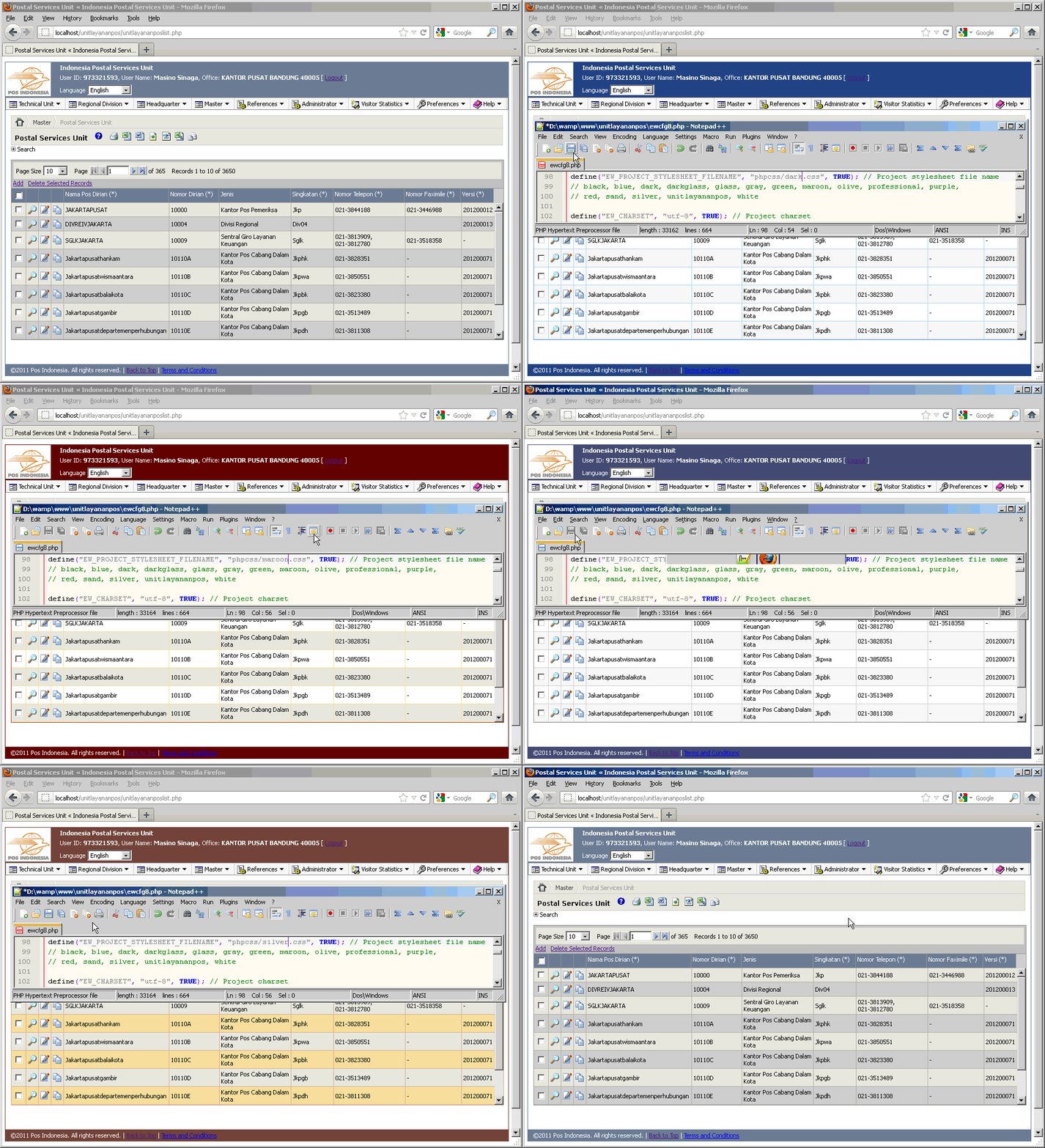
[hidepost]
- First of all, make sure you have implemented this and this customization.
- Alter your users table by adding a new field named theme with field type varchar(20).
-
Open your /Script/template.php file, and find this code:
<!--##=SYSTEMFUNCTIONS.FavIcon##-->
after that line, please insert this following code:
<?php if ((@EW_PROJECT_STYLESHEET_FILENAME=="phpcss/black.css") || (@EW_PROJECT_STYLESHEET_FILENAME=="phpcss/white.css")) { $bordercolor = "#9F9F9F"; } elseif (@EW_PROJECT_STYLESHEET_FILENAME=="phpcss/blue.css") { $bordercolor = "#2647A0"; // OK } elseif (@EW_PROJECT_STYLESHEET_FILENAME=="phpcss/dark.css") { $bordercolor = "#000084"; } elseif (@EW_PROJECT_STYLESHEET_FILENAME=="phpcss/darkglass.css") { $bordercolor = "#4E4F51"; } elseif (@EW_PROJECT_STYLESHEET_FILENAME=="phpcss/glass.css") { $bordercolor = "#10A3BC"; } elseif (@EW_PROJECT_STYLESHEET_FILENAME=="phpcss/gray.css") { $bordercolor = "#708090"; } elseif (@EW_PROJECT_STYLESHEET_FILENAME=="phpcss/green.css") { $bordercolor = "#3A7A25"; } elseif (@EW_PROJECT_STYLESHEET_FILENAME=="phpcss/maroon.css") { $bordercolor = "#620000"; } elseif (@EW_PROJECT_STYLESHEET_FILENAME=="phpcss/olive.css") { $bordercolor = "#718961"; } elseif (@EW_PROJECT_STYLESHEET_FILENAME=="phpcss/professional.css") { $bordercolor = "#40546A"; } elseif (@EW_PROJECT_STYLESHEET_FILENAME=="phpcss/purple.css") { $bordercolor = "#3E3276"; } elseif (@EW_PROJECT_STYLESHEET_FILENAME=="phpcss/red.css") { $bordercolor = "#B1174D"; } elseif (@EW_PROJECT_STYLESHEET_FILENAME=="phpcss/sand.css") { $bordercolor = "#755233"; } elseif (@EW_PROJECT_STYLESHEET_FILENAME=="phpcss/silver.css") { $bordercolor = "#9C9AB7"; } elseif (@EW_PROJECT_STYLESHEET_FILENAME=="phpcss/white.css") { $bordercolor = "#DCDCDC"; } elseif (@EW_PROJECT_STYLESHEET_FILENAME=="phpcss/default.css") { // <-- please adjust "default.css" with your default .css file name $bordercolor = "#FF6600"; } ?> - Download these two files:
- Extract phpcss.zip (there are 16 .css files inside) to your /Script template file.
- Extract switch-theme.zip (there are 16 .php files inside) to your /Script template file.
-
Open your /Script/control.xml file, and find this code:
	<!--
		YUI files
	-->
	<control id="yui" type="copy" remark="Copy YUI files" ofolder="yui290" ifolder="yui290" cond="proj/LocalYUIFiles/EQ/True" />
after the last line of that code, please insert this following code:
<!-- .css files --> <control id="black.css" type="copy" remark="Copy black.css" ofolderid="_css" ifiles="black.css" /> <control id="blue.css" type="copy" remark="Copy blue.css" ofolderid="_css" ifiles="blue.css" /> <control id="dark.css" type="copy" remark="Copy dark.css" ofolderid="_css" ifiles="dark.css" /> <control id="darkglass.css" type="copy" remark="Copy darkglass.css" ofolderid="_css" ifiles="darkglass.css" /> <control id="glass.css" type="copy" remark="Copy glass.css" ofolderid="_css" ifiles="glass.css" /> <control id="gray.css" type="copy" remark="Copy gray.css" ofolderid="_css" ifiles="gray.css" /> <control id="green.css" type="copy" remark="Copy green.css" ofolderid="_css" ifiles="green.css" /> <control id="maroon.css" type="copy" remark="Copy maroon.css" ofolderid="_css" ifiles="maroon.css" /> <control id="olive.css" type="copy" remark="Copy olive.css" ofolderid="_css" ifiles="olive.css" /> <control id="professional.css" type="copy" remark="Copy professional.css" ofolderid="_css" ifiles="professional.css" /> <control id="purple.css" type="copy" remark="Copy purple.css" ofolderid="_css" ifiles="purple.css" /> <control id="red.css" type="copy" remark="Copy red.css" ofolderid="_css" ifiles="red.css" /> <control id="sand.css" type="copy" remark="Copy sand.css" ofolderid="_css" ifiles="sand.css" /> <control id="silver.css" type="copy" remark="Copy silver.css" ofolderid="_css" ifiles="silver.css" /> <control id="white.css" type="copy" remark="Copy white.css" ofolderid="_css" ifiles="white.css" /> <control id="default.css" type="copy" remark="Copy default.css" ofolderid="_css" ifiles="default.css" /> <!-- Themes menu --> <control id="themeblack.php" type="copy" remark="Copy themeblack.php" ifiles="themeblack.php" /> <control id="themeblue.php" type="copy" remark="Copy themeblue.php" ifiles="themeblue.php" /> <control id="themedark.php" type="copy" remark="Copy themedark.php" ifiles="themedark.php" /> <control id="themedarkglass.php" type="copy" remark="Copy themedarkglass.php" ifiles="themedarkglass.php" /> <control id="themeglass.php" type="copy" remark="Copy themeglass.php" ifiles="themeglass.php" /> <control id="themegray.php" type="copy" remark="Copy themegray.php" ifiles="themegray.php" /> <control id="themegreen.php" type="copy" remark="Copy themegreen.php" ifiles="themegreen.php" /> <control id="thememaroon.php" type="copy" remark="Copy thememaroon.php" ifiles="thememaroon.php" /> <control id="themeolive.php" type="copy" remark="Copy themeolive.php" ifiles="themeolive.php" /> <control id="themeprofessional.php" type="copy" remark="Copy themeprofessional.php" ifiles="themeprofessional.php" /> <control id="themepurple.php" type="copy" remark="Copy themepurple.php" ifiles="themepurple.php" /> <control id="themered.php" type="copy" remark="Copy themered.php" ifiles="themered.php" /> <control id="themesand.php" type="copy" remark="Copy themesand.php" ifiles="themesand.php" /> <control id="themedefault.php" type="copy" remark="Copy themesidistrapos.php" ifiles="themedefault.php" /> <control id="themesilver.php" type="copy" remark="Copy themesilver.php" ifiles="themesilver.php" /> <control id="themewhite.php" type="copy" remark="Copy themewhite.php" ifiles="themewhite.php" /> - Create 16 menu item and then assign the .php file with the 16 files from the switch-theme.zip file above.
- Re-generate all of your script files using PHPMaker as usual.
[/hidepost]
Leave a Reply
You must be logged in to post a comment.