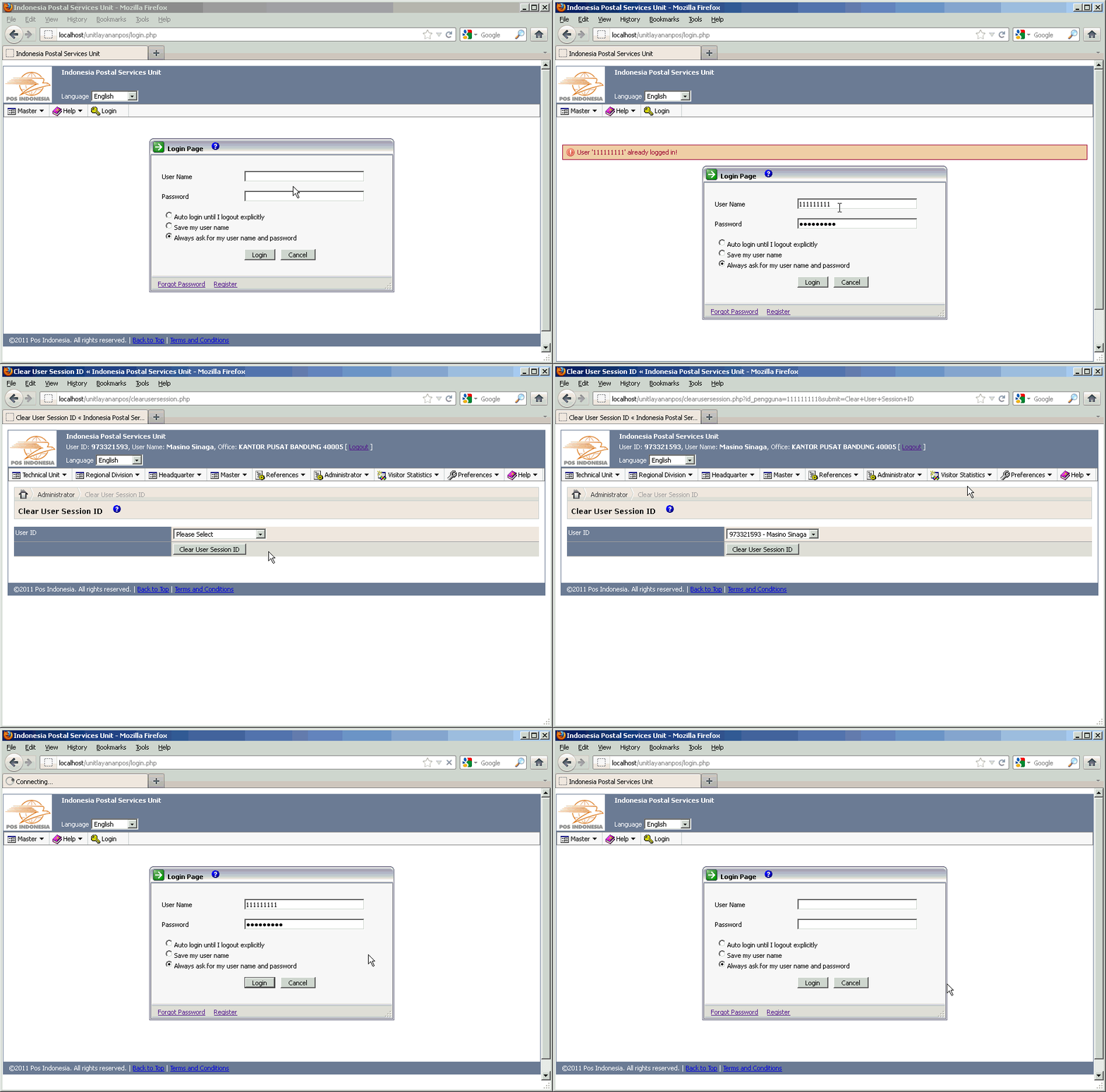
Have your user ever encountered the problem when receiving the warning message from your web application that created by PHPMaker as following: "User NX already logged in!" (even this user NX has closed the browser) and then he/she report it to you as Administrator of your web application? Well, this warning message shows up usually when the user closes the browser without logout explicitly from the web application, then the user clears the cookies/cache of his/her browser, and then he/she is trying to login again to the web application. When this is happened, each time your user is trying to login to your web application, then he/she will get the same messsage as I mentioned above. In other words, your user is not able to login to the web application anymore.
The causes of this problem is that since the user closes the browser and does not do logout explicitly from the web application, then the SessionID value is still being kept in the User Profile field in the users table, and in the same time, the cookies that hold that SessionID has been removed from the browser. The only solution to overcome this problem is by clearing the SessionID value that stored in the User Profile field of your users table. Unfortunately, when you as Administrator go to that users table and check that User Profile field, then you will see that the value of this field contains some User Profile values, such as: SessionID, LoginRetryCount, LastPasswordChangedDate, and LastBadLoginDateTime. All of those values are stored as an array in that User Profile field. So you have to be careful to remove the value of that user's SessionID, otherwise your web application will display the message to your user that the User Profile value is corrupted.
In order to avoid it happened, and also to avoid the mistyped or misedited while clearing that SessionID value, then there should be a web page provided to you as an Administrator in order to manage that SessionID. Well, the good news is: I have successfully created that page that can be used to clear or remove or free-up your users' SessionID. This page can only be accessed by the users which have Administrator level (of course, you can add another user levels in addition to Administrator according to your needs by yourself later). There is only one ComboBox and one CommandButton in this page. The ComboBox will only display the User ID which have the SessionID value. By using this page, then you (as an Administrator) will not to be worried anymore to clear your users' SessionID.
In the future, when your users report the same problem as the message shown above, then simply choose the User ID from that ComboBox, and click on the CommandButton, and voila... the value of that user's SessionID will be removed/cleared, then tell your user back to try to login again, and this time he/she will be happy. The User IDs which have the SessionID that had been cleared (including those which have logged out explicitly) will not be listed in that ComboBox again. So you will only see the User IDs which have the SessionID value are listed there.
All we have to do is customizing the PHPMaker template files. In other words, we do not modify any generated script files.
Please click on the following image below to watch the demo:
[hidepost]
-
Open your C:\Program Files\PHPMaker 8\languages\english.xml file, and find this code:
</global>
before that line, please insert this following code:
	<phrase id="ClearUserSessionID" value="Clear User Session ID"/>
	<phrase id="ChooseUserIDForSessionID" value="Choose User ID which to be cleared the SessionID!"/>
	<phrase id="UserIDNotFound" value="Sorry, the User ID is not found!"/>
	<phrase id="SessionIDCurrentlyFree" value="SessionID that belongs to '%u' is currently free!"/>
	<phrase id="SessionIDSuccessfullyCleared" value="SessionID that belongs to '%u' has been successfully cleared!"/>
Do the same step for another .xml language you have (if your web application supports for multi language), as usual. For example, I am only using Indonesian language, so I will add the following code just like above to the C:\Program Files\PHPMaker 8\languages\indonesian.xml file:
	<phrase id="ClearUserSessionID" value="Bersihkan SessionID Pengguna"/>
	<phrase id="ChooseUserIDForSessionID" value="Pilih ID Pengguna yang akan dibebaskan SessionID-nya!"/>
	<phrase id="UserIDNotFound" value="Maaf, ID Pengguna tersebut tidak ditemukan!"/>
	<phrase id="SessionIDCurrentlyFree" value="SessionID milik pengguna '%u' sedang dalam keadaan bebas!"/>
	<phrase id="SessionIDSuccessfullyCleared" value="SessionID milik pengguna '%u' sudah berhasil dibebaskan!"/>
-
Open your /Script/ewcfg.php file, and find this code:
define("EW_USER_ID_FIELD", "<!--##=sFld##-->", TRUE);If you do not find it, then add the following code:
<!--##
	If PROJ.SecLoginIDFld <> "" Then
		Set FIELD = SECTABLE.Fields(PROJ.SecLoginIDFld)
		sFld = ew_FieldName
	End If
##-->
define("EW_USER_ID_FIELD", "<!--##=sFld##-->", TRUE);
before the following code:
define("EW_USER_NAME_FILTER", "<!--##=ew_Quote(sFilter)##-->", TRUE);otherwise, just skip this step.
-
Still in the /Script/ewcfg.php file, find again this code:
// Show SQL for debug
define("EW_DEBUG_ENABLED", <!--##=ew_Val(PROJ.GetV("Debug"))##-->, TRUE); // TRUE to debug
if (EW_DEBUG_ENABLED)
	error_reporting(-1); // Report all PHP errors
after the last line of that code, please insert this following code:
// Begin of Clear Users SessionID, added by Masino Sinaga, December 7, 2011 define("USER_ID", "id_pengguna", TRUE); // change with your user id field in your users table define("FIRST_NAME", "nama_awal", TRUE); // change with your first name field in your users table define("LAST_NAME", "nama_akhir", TRUE); // change with your last name field in your users table define("USER_PROFILE", "profil_pengguna", TRUE); // change with your user profile field in your users table // End of Clear Users SessionID, added by Masino Sinaga, December 7, 2011 -
Open your phpcommon-scripts.php file, and find this code:
$UserProfile->LoadProfile(@$_SESSION[EW_SESSION_USER_PROFILE]);
then after the line of that code, please insert this following code:
$UserProfile->LoadProfileFromDatabase(CurrentUserName()); // Added by Masino Sinaga, December 6, 2011 in order to not autologout after clear another user's session ID whenever back to another page.
Please note that this step is really important in order to avoid autologout when you switch from the custom page (that we will create based on the blank page) to another pages in your web application. So make sure you do not skip this step and do it carefully!
- Go to your PHPMaker project application, then generate a blank page. This blank page we will use as the basic template for generating the custom page that we will use to manage the SessionID we discussed in the article above. Click this link if you do not know how to generate it.
-
After you generate a blank page above, then make sure you rename the blankpage.php file to another name, for example, I rename it to become: clearusersession.php, afterwards open the clearusersession.php file, and find this code:
custompage
then replace it with this following word:
ClearUserSessionID
so this will be a meaningful name, isn't? 😉
-
Still in that clearusersession.php file, find again this code:
<!-- Put your custom html here -->
then replace it with this following code:
<!-- Put your custom html here --> <?php global $Language, $conn, $UP; ?> <body onload="document.frmreset.<?php echo USER_ID; ?>.focus()"> <span class="phpmaker ewTitle"><?php echo $Language->Phrase('ClearUserSessionID'); ?></span> <?php $ClearUserSessionID->ShowMessage(); ?> <br /> <form name="frmreset" action="clearusersession.php" method="get" > <table border="0" class="ewTable"> <tr> <td class="ewTableHeader" width="30%"><?php echo $Language->Phrase('UserID'); ?></td> <td width="70%"> <select name="<?php echo USER_ID; ?>"> <option value="0" selected ><?php echo $Language->Phrase('PleaseSelect'); ?></option> <?php $sSqlWrk = "SELECT ".EW_USER_ID_FIELD.", ".FIRST_NAME.", ".LAST_NAME." FROM ".EW_USER_TABLE." WHERE `".USER_PROFILE."` NOT LIKE '%\"SessionID\";s:0:%' ORDER BY ".EW_USER_ID_FIELD; $rswrk = $conn->Execute($sSqlWrk); while (!$rswrk->EOF) { if (isset($_GET[USER_ID])) { $selected = ($rswrk->fields(USER_ID)==$_GET[USER_ID])?'selected':''; } else { $selected = ''; } ?> <option value="<?php echo $rswrk->fields(USER_ID);?>"<?php echo $selected; ?>><?php echo $rswrk->fields(USER_ID);?> - <?php echo $rswrk->fields(FIRST_NAME);?> <?php echo $rswrk->fields(LAST_NAME);?></option> <?php $rswrk->MoveNext(); } $rswrk->Close(); ?> </select> </td> </tr> <tr> <td class="ewTableHeader"> </td> <td><span class="phpmaker"><input type="submit" name="submit" id="submit" value="<?php echo $Language->Phrase('ClearUserSessionID'); ?>"></span></td> </tr> </table> </form> </body> -
Still in that clearusersession.php file, replace the whole code in the function Page_Init(), so it will completely become like the following:
function Page_Init() { global $Language, $Security; // Security $Security = new cAdvancedSecurity(); // The codes below for security if (!$Security->IsLoggedIn()) $Security->AutoLogin(); if (!$Security->IsLoggedIn()) $this->Page_Terminate("login.php"); // At the moment, only Administrator can access this page! if (!$Security->IsAdmin()) { header("Location: logout.php"); } // Global Page Loading event (in userfn*.php) Page_Loading(); } -
Still in the clearusersession.php file, replace the whole code in the function Page_Main(), so it will completely become like the following:
function Page_Main() { global $Language, $conn; if (isset($_GET[USER_ID]) || $_GET[USER_ID]=="0") { $this->setFailureMessage($Language->Phrase('ChooseUserIDForSessionID')); } else { $sSqlWrk = "SELECT ".EW_USER_ID_FIELD.", ".FIRST_NAME.", ".LAST_NAME." FROM ".EW_USER_TABLE." WHERE ".EW_USER_ID_FIELD." LIKE '".isset($_GET[USER_ID])."' ORDER BY ".EW_USER_ID_FIELD.""; $rswrk = $conn->Execute($sSqlWrk); if ($rswrk->RecordCount() > 0) { $UP = new cUserProfile(); if ($UP->LoadProfileFromDatabase($_GET[USER_ID])) { $us = $UP->GetValue(EW_USER_PROFILE_SESSION_ID); if ($us == "") { $this->setSuccessMessage(str_replace("%u", $_GET[USER_ID], $Language->Phrase('SessionIDCurrentlyFree'))); $UP->SaveProfileToDatabase($_GET[USER_ID]); } else { $UP->SetValue(EW_USER_PROFILE_SESSION_ID, ""); $UP->SaveProfileToDatabase($_GET[USER_ID]); $this->setSuccessMessage(str_replace("%u", $_GET[USER_ID], $Language->Phrase('SessionIDSuccessfullyCleared'))); } } $rswrk->Close(); } else { if (strlen($_GET[USER_ID])>0) { $this->setFailureMessage($Language->Phrase('UserIDNotFound')); } } } } - Generate the whole of your php script code to apply the changes in the phpcommon-scripts.php file to most of your generated .php code!
[/hidepost]
[…] if there is an active User Session ID, then system will prevent him to login. He cannot login until someone which has Administrator level will clear his Session ID from the database, or the user has to wait until his Session ID […]