One of the greatest features that I love so much from PHPMaker 10 is the ability to display the link either by using Button Group and or DropDown Button (since it used Bootstrap). This will obviously save a lot of space in your web applications. Not only that, it also has the ability to display Image and Text in some Options that provided by PHPMaker easily by using server event. As we have already known, by default, PHPMaker 10 only displays either the Text only or the Image only (and not Image and Text) for the links in List Options and Export Options.
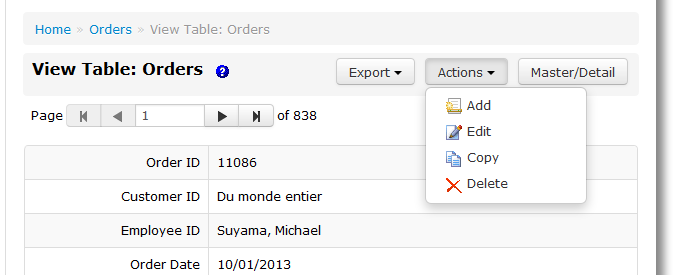
PHPMaker only supports for displaying both Image and Text mostly on the List page. In View page, you cannot display both Image and Text for the Other Options such as for Actions Button Group, since the template has not supported for that. PHPMaker also has not provided the related settings for displaying both Image and Text from the Tables setup. That is why you have to use it using server event.
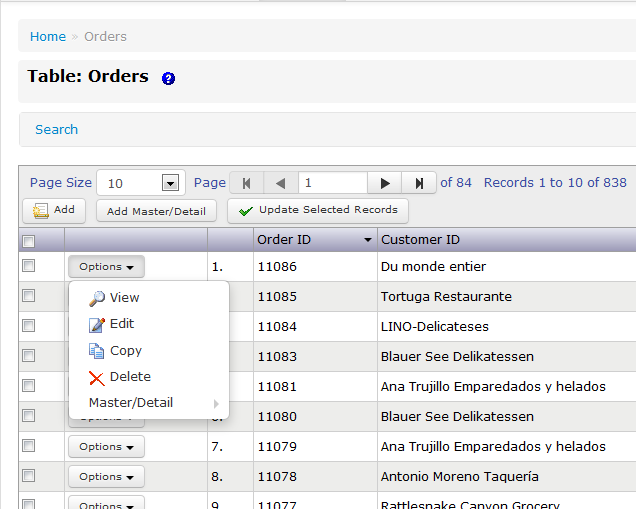
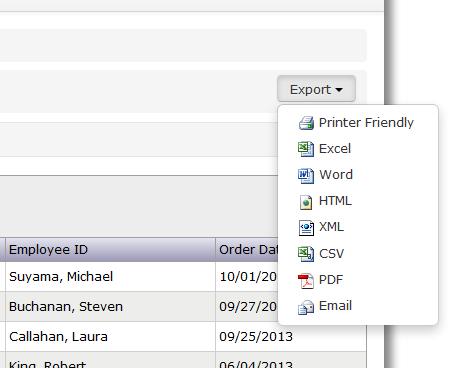
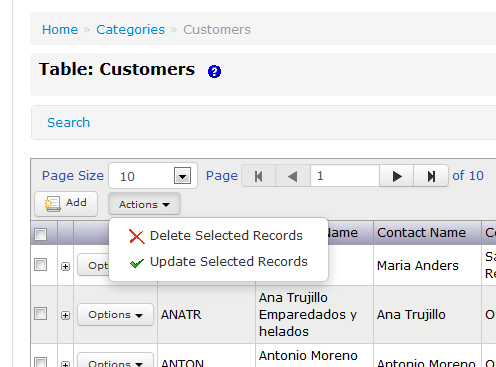
This article will show you how to display both Image and Text in the link on all Options (List Options, Export Options, and Other Options) by using server event. I will show you also how to display it only for the certain page, or even how to override the global setting using the server event in page class level. In addition, now you can display it also for Other Options in View page (PHPMaker 10 has not supported it, yet).
All this abilities are handled by MasinoFixedWidthSite10 extension. The other advantage that you will get if you use this extension, the images that will be displayed use CSS Sprites technique. This will decrease the HTTP requests to your web server. Make sure you have downloaded the latest version of this extension (and others that related to it), and enabled it in your PHPMaker project. Also make sure you have downloaded and enabled all the extensions for PHPMaker 10.
 |
 |
 |
 |
[hidepost]
To display both Image and Text in all those Options on all pages, then simply put this following code in Server Events -> Global -> All Pages -> Page_Rendering:
	if (CurrentPageID() == "list") {
		CurrentPage()->ListOptions->UseImageAndText = TRUE;
		CurrentPage()->OtherOptions["addedit"]->UseImageAndText = TRUE;
		CurrentPage()->OtherOptions["detail"]->UseImageAndText = TRUE;
		CurrentPage()->OtherOptions["action"]->UseImageAndText = TRUE;
		CurrentPage()->ExportOptions->UseImageAndText = TRUE;
	}
	if (CurrentPageID() == "view") {
		CurrentPage()->ExportOptions->UseImageAndText = TRUE;
		CurrentPage()->OtherOptions["action"]->UseImageAndText = TRUE;
	}
To override the global setting above, for example in a List page, then insert the following code in Server Event -> Table-Specific -> List Page -> Page_Render of your desired table:
		$this->ListOptions->UseImageAndText = FALSE;
		$this->ExportOptions->UseImageAndText = FALSE;
		$this->OtherOptions["addedit"]->UseImageAndText = FALSE;
		$this->OtherOptions["action"]->UseImageAndText = FALSE;
Please note that you can only override the global server event by the page class server event, but not vice versa. In other words, you cannot implement that global function in Page_Rendering above for the certain table, if you have already defined the related code in the page class level of the table: using Page_Render.
[/hidepost]
Hi Masino,
How can I do to add a alert popup after click on custom link in list page?
My code in OrdersMaster (in Server Events –> List Page –> List_Options_Rendered) is:
// ListOptions Rendered event
function ListOptions_Rendered() {
// Example:
//$this->ListOptions->Items[“new”]->Body = “”;
//$this->ListOptions->Items[“add”]->Body = “”; // Remove the add link
$this->ListOptions->Items[“edit”]->Body = “”; // Remove the edit link
$this->OtherOptions[“addedit”]->Items[“add”]->Visible = FALSE;
//$this->ListOptions->Items[“new”]->Body = “KeyToJson() . “});\”>StampaOrdine“;
$this->ListOptions->Items[“StampaOrdine_x”]->Body = “OrderId->CurrentValue).”\”>Stampa Ordine“;
$this->ListOptions->Items[“CreaFattura_x”]->Body = “OrderId->CurrentValue).”\”>Crea Fattura“;
}
___________________________________________________________________________________________________________________________________________________________________
My code in OrdersMaster (in Server Events –> List Page –> List_Options_Load) is:
// ListOptions Load event
function ListOptions_Load() {
// Example:
$this->ListOptions->Add(“StampaOrdine_x”); // Replace abclink with your name of the link
$this->ListOptions->Items[“StampaOrdine_x”]->Header = “Stampa Ordine“;
$this->ListOptions->Add(“CreaFattura_x”); // Replace abclink with your name of the link
$this->ListOptions->Items[“CreaFattura_x”]->Header = “CreaFattura“;
}
I mean when I click on Link “Crea Fattura” (the link Crea fattura call a php custom page), I need to receive a popup message for example “Are you sure?”. If I click “YES” on popup then call PHP Custom Page, otherwise nothing to do.
Then, Do you Know if I can add icon on links?
$this->ListOptions->Items[“StampaOrdine_x”]->Body = “OrderId->CurrentValue).”\”>Stampa Ordine“;
$this->ListOptions->Items[“CreaFattura_x”]->Body = “OrderId->CurrentValue).”\”>Crea Fattura“;
How can I do to remove text “Stampa Ordine” and “Crea Fattura” and substitute with Icon?
Many Thanks,
Andrea.
Please do not ask the question that is not related to Masino Extensions. You can ask such question to The Official PHPMaker Forum.
Hi Masino,
I use phpmaker 2018. I have a problem with your script above. All work fine but I don’t see the arrow in Master/Deatal. I need to show, with arrow in Master/detail, the edit link. Without your script all works fine but with your not works. Is possible to do this? And then,
Is possible to hide custom link (example, with orderDetail count record == 0 hide custom links?
Thank you so much,
Andrea
What kind of arrow did you mean? Please post the link to show the related screenshot you meant.
Andrea, your membership has ended automatically by Paypal on Tue Apr 19, 2016 8:50 pm UTC, due to unsuccessfull payment from your Paypal.
Sorry, I cannot provide you the support anymore. If you want to use Masino Extensions for PHPMaker and PHP Report Maker, especially for the latest version, you need to pay the membership, and I suggest you to choose the Yearly membership type for long support.
Thanks.