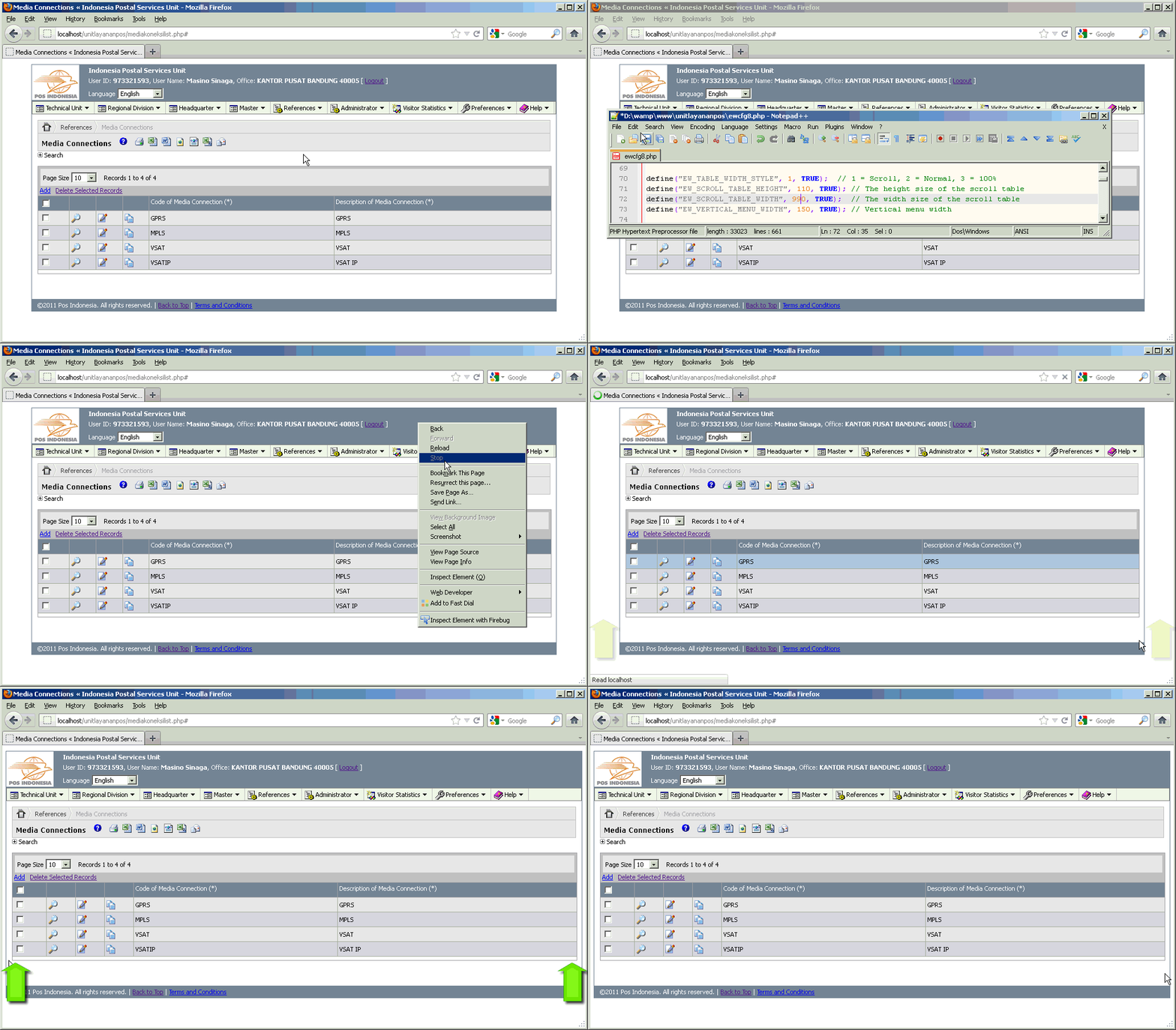
PHPMaker generates your content page width without optimizing it to the maximum width of your website. For example, if your list page contains a table with only two columns or fields, then you will see that this total table width will not adjust to the maximum width of your website. Therefore, you will see many blank space at the right side of your table.
This following modification will solve the problem, by optimizing the total table width to maximum width of your website, so there is no blank space anymore at the right side of your table. Also, you will know how to create your own style and overide the old style with it. So we will add it into the core style that being used by PHPMaker to generate your .css file.
Updated: This modification has been tested and works fine in the latest version PHPMaker 8.0.3 on August 27, 2011.
All we have to do is customizing PHPMaker template file. In other words, we will not modify the generated script files.
Please click on the following image below to watch the demo:
[hidepost]
-
Open your C:\Documents and Settings\YourName\My Documents\PHPMaker\Templates\phpv80.zip\extensions\ScrollingTable\scroll.js file, and find this code:
<?php if ($<!--##=gsTblVar##-->->CurrentAction == "" && $<!--##=gsTblVar##-->->Export == "") { ?>
<script type="text/javascript">
<!--
ew_ScrollableTable(ewDom.get('gmp_<!--##=gsTblVar##-->'), "<!--##=sScrollWidth##-->", "<!--##=sScrollHeight##-->");
//-->
</script>
<?php } ?>
then replace it with this following code:
<?php if ($<!--##=gsTblVar##-->->CurrentAction == "" && $<!--##=gsTblVar##-->->Export == "") { ?> <?php if (EW_TABLE_WIDTH_STYLE==1) { ?> <script type="text/javascript"> <!-- ew_ScrollableTable(ewDom.get('gmp_<!--##=gsTblVar##-->'), "<?php echo EW_SCROLL_TABLE_WIDTH; ?>px", "<?php echo EW_SCROLL_TABLE_HEIGHT; ?>px"); //--> </script> <?php } ?> <?php } ?> -
Open your ewcfg.php file, find this code (avoid this step if you cannot find this code):
// Begin of modification by Masino Sinaga, February 19, 2011
define("EW_SCROLL_TABLE_WIDTH", 890, TRUE);  // The width size of the scroll table
define("EW_VERTICAL_MENU_WIDTH", 150, TRUE); // Vertical menu width
define("EW_TOTAL_WIDTH", EW_SCROLL_TABLE_WIDTH + EW_VERTICAL_MENU_WIDTH + 20, TRUE);
// End of modification by Masino Sinaga, February 19, 2011
then replace it with this following code (avoid this step if you cannot find that code in this step above):
// Begin of modification by Masino Sinaga, February 19, 2011 // define("EW_SCROLL_TABLE_WIDTH", 890, TRUE); // The width size of the scroll table // define("EW_VERTICAL_MENU_WIDTH", 150, TRUE); // Vertical menu width // define("EW_TOTAL_WIDTH", EW_SCROLL_TABLE_WIDTH + EW_VERTICAL_MENU_WIDTH + 20, TRUE); // End of modification by Masino Sinaga, February 19, 2011 -
Still in the ewcfg.php file, find again this code:
// General
before that line, insert this following code:
// Begin of modification by Masino Sinaga, for customize the height of table scroll, August 22, 2011 // Begin of modification by Masino Sinaga, February 19, 2011 define("EW_TABLE_WIDTH_STYLE", 1, TRUE); // 1 = Scroll, 2 = Normal, 3 = 100% define("EW_SCROLL_TABLE_HEIGHT", 350, TRUE); // The height size of the scroll table define("EW_SCROLL_TABLE_WIDTH", 990, TRUE); // The width size of the scroll table define("EW_VERTICAL_MENU_WIDTH", 150, TRUE); // Vertical menu width if (EW_MENU_HORIZONTAL) { define("EW_TOTAL_WIDTH", EW_SCROLL_TABLE_WIDTH + 20, TRUE); } else { define("EW_TOTAL_WIDTH", EW_SCROLL_TABLE_WIDTH + EW_VERTICAL_MENU_WIDTH + 20, TRUE); } // define("EW_TOTAL_WIDTH", EW_SCROLL_TABLE_WIDTH + EW_VERTICAL_MENU_WIDTH + 20, TRUE); // End of modification by Masino Sinaga, February 19, 2011 // End of modification by Masino Sinaga, for customize the height of table scroll, August 22, 2011 -
Open your list-script.php file, and find this code:
<!--## If bGridAdd Then ##-->
}
<!--## End If ##-->
?>
then replace it with this following code:
<!--## If bGridAdd Then ##--> } <!--## End If ##--> ?> <table id="ewContainer" cellspacing="0" cellpadding="0" border="0" <?php if (EW_TABLE_WIDTH_STYLE==1) { echo "width=".EW_SCROLL_TABLE_WIDTH."px"; } elseif (EW_TABLE_WIDTH_STYLE==3) {echo "width=100%"; } ?>> <tr><td colspan="3"> -
Still in the list-script.php file, find again this code:
<!--##include phpcommon.php/phpcommon-message##-->
<br />
<table cellspacing="0" class="ewGrid"><tr><td class="ewGridContent">
then replace it with this following code:
<!--##include phpcommon.php/phpcommon-message##--> <br /> <table cellspacing="0" class="ewGrid" <?php if (EW_TABLE_WIDTH_STYLE==1) { echo "width=".EW_SCROLL_TABLE_WIDTH."px"; } elseif (EW_TABLE_WIDTH_STYLE==3) {echo "width=100%"; } ?>><tr><td class="ewGridContent"> -
Open your search-script.php, and find this code:
<!--##session htmtable##--> <p class="phpmaker ewTitle"><!--##@Search##--> <?php echo $Language->Phrase("<!--##="TblType" & TABLE.TblType##-->") ?><?php echo $<!--##=gsTblVar##-->->TableCaption() ?></p>then replace it with this following code:
<!--##session htmtable##--> <span class="ewTitle"><!--##@Search##--> <?php echo $Language->Phrase("<!--##="TblType" & TABLE.TblType##-->") ?><?php echo $<!--##=gsTblVar##-->->TableCaption() ?></span> -
Still in the search-script.php file, find again this code:
<table cellspacing="0" class="ewGrid"<!--##=sMultiPageStyle##-->><tr><td class="ewGridContent">
<div class="ewGridMiddlePanel">
<table cellspacing="0"<!--##=ewCSSTableClass##-->>
then replace it with this following code:
<table cellspacing="0" class="ewGrid" <?php if (EW_TABLE_WIDTH_STYLE==1) { echo "width=".EW_SCROLL_TABLE_WIDTH."px"; } elseif (EW_TABLE_WIDTH_STYLE==3) {echo "width=100%"; } ?>><tr><td class="ewGridContent"> <div class="ewGridMiddlePanel"> <table cellspacing="0"<!--##=ewCSSTableClass##--> <?php if (EW_TABLE_WIDTH_STYLE==1) { echo "width=".EW_SCROLL_TABLE_WIDTH."px"; } elseif (EW_TABLE_WIDTH_STYLE==3) {echo "width=100%"; } ?>> -
Open your view-script.php file, and find this code:
<?php if ($<!--##=gsTblVar##-->->Export == "") { ?>
<table cellspacing="0" cellpadding="0"><tr><td>
and then replace it with this following code:
<?php if ($<!--##=gsTblVar##-->->Export == "") { ?> <table cellspacing="0" cellpadding="0" <?php if (EW_TABLE_WIDTH_STYLE==1) { echo "width=".EW_SCROLL_TABLE_WIDTH."px"; } elseif (EW_TABLE_WIDTH_STYLE==3) {echo "width=100%"; } ?>><tr><td> -
Still in the view-script.php file, find this code:
<table cellspacing="0" class="ewGrid"<!--##=sMultiPageStyle##-->><tr><td class="ewGridContent">
then replace it with this following code:
<table cellspacing="0" class="ewGrid"<!--##=sMultiPageStyle##--> <?php if (EW_TABLE_WIDTH_STYLE==1) { echo "width=".EW_SCROLL_TABLE_WIDTH."px"; } elseif (EW_TABLE_WIDTH_STYLE==3) {echo "width=100%"; } ?>><tr><td class="ewGridContent"> -
Open your add-script.php file, and find this code:
<table cellspacing="0" cellpadding="0"><tr><td>
then replace it with this following code:
<table cellspacing="0" cellpadding="0" <?php if (EW_TABLE_WIDTH_STYLE==1) { echo "width=".EW_SCROLL_TABLE_WIDTH."px"; } elseif (EW_TABLE_WIDTH_STYLE==3) {echo "width=100%"; } ?>><tr><td> -
Still in the add-script.php file, find again this code:
<table cellspacing="0" class="ewGrid"<!--##=sMultiPageStyle##-->><tr><td class="ewGridContent">
then replace it with this following code:
<table cellspacing="0" class="ewGrid"<!--##=sMultiPageStyle##--> <?php if (EW_TABLE_WIDTH_STYLE==1) { echo "width=".EW_SCROLL_TABLE_WIDTH."px"; } elseif (EW_TABLE_WIDTH_STYLE==3) {echo "width=100%"; } ?>><tr><td class="ewGridContent"> -
Open your edit-script.php file, and find this code:
<table cellspacing="0" cellpadding="0"><tr><td>
then replace it with this following code:
<table cellspacing="0" cellpadding="0" <?php if (EW_TABLE_WIDTH_STYLE==1) { echo "width=".EW_SCROLL_TABLE_WIDTH."px"; } elseif (EW_TABLE_WIDTH_STYLE==3) {echo "width=100%"; } ?>><tr><td> -
Still in the edit-script.php file, find again this code:
<table cellspacing="0" class="ewGrid"<!--##=sMultiPageStyle##-->><tr><td class="ewGridContent">
then replace it with this following code:
<table cellspacing="0" class="ewGrid"<!--##=sMultiPageStyle##--> <?php if (EW_TABLE_WIDTH_STYLE==1) { echo "width=".EW_SCROLL_TABLE_WIDTH."px"; } elseif (EW_TABLE_WIDTH_STYLE==3) {echo "width=100%"; } ?>><tr><td class="ewGridContent"> -
Open your delete-script.php file, and find this code:
<table class="ewGrid"><tr><td class="ewGridContent">
then replace it with this following code:
<table class="ewGrid"><tr><td class="ewGridContent" <?php if (EW_TABLE_WIDTH_STYLE==1) { echo "width=".EW_SCROLL_TABLE_WIDTH."px"; } elseif (EW_TABLE_WIDTH_STYLE==3) {echo "width=100%"; } ?>> -
Open your master-script.php file, and find this code:
<table cellspacing="0" class="ewGrid"><tr><td class="ewGridContent">
then replace it with this following code:
<table cellspacing="0" class="ewGrid" <?php if (EW_TABLE_WIDTH_STYLE==1) { echo "width=".EW_SCROLL_TABLE_WIDTH."px"; } elseif (EW_TABLE_WIDTH_STYLE==3) {echo "width=100%"; } ?>><tr><td class="ewGridContent"> -
Open your update-script.php file, and find this code:
<table cellspacing="0" class="ewGrid"<!--##=sMultiPageStyle##-->><tr><td class="ewGridContent">
then replace it with this following code:
<table cellspacing="0" class="ewGrid"<!--##=sMultiPageStyle##--> <?php if (EW_TABLE_WIDTH_STYLE==1) { echo "width=".EW_SCROLL_TABLE_WIDTH."px"; } elseif (EW_TABLE_WIDTH_STYLE==3) {echo "width=100%"; } ?>><tr><td class="ewGridContent"> - Re-generate your script using PHPMaker.
[/hidepost]
This feature is applicable to sites created with 9.0.2?
Yes. Follow the article How to Optimize Main Table Width to Maximum Width of Your Site Created with PHPMaker 9.0.1.